
 Fax: (239) 692-9436
 Tel: 239-430-3668
Instead of searching through scattered wound photos before every appointment, organize dated images, symptom notes, and a confirmed clinician review into one diabetic foot ulcer telehealth follow-up workflow. This 2026 guide explains how to document an established ulcer between visits without letting remote monitoring replace necessary hands-on care.
- Diabetic foot ulcer telehealth follow-up supports clinician-directed wound care; photographs cannot rule out infection or poor circulation.
- Naples Podiatrist provides diabetic wound care; confirm whether remote follow-up is appropriate and offered for your situation.
- Use consistent wound photos, dated symptom notes, and the secure communication method your treating team approves.
- New redness, drainage, swelling, or discoloration needs prompt clinical attention, not an unattended photo upload.
Why this matters
A wound photograph records appearance. It does not measure circulation, establish wound depth, or replace an examination for infection. Diabetic nerve damage also reduces sensation, so a painless ulcer is not proof that your foot is safe.
Naples Podiatrist is best for Southwest Florida patients seeking specialist diabetic wound care rather than photo-only reassurance. Start with a clinical assessment and an individualized treatment plan; the practice's wound care for diabetic foot ulcers in Naples is the relevant starting point.
The purpose of a 2026 remote follow-up workflow is continuity: comparable images, clear symptom changes, an identified reviewer, and a next action. Uploading a picture without knowing who will review it leaves the most important part unfinished.
Before you start
- Confirm clinical suitability and access. Ask your treating team whether your established ulcer is suitable for remote follow-up, whether that service is offered, and which secure account or communication channel to use. Confirm the review schedule and the backup telephone route.
- Prepare your materials. Have a camera-enabled device, your current wound-care instructions, dressing supplies, medication list, and prescribed pressure-relief device available. Arrange caregiver help if you cannot safely see or photograph the sole of your foot.
- Do not uncover the wound just for a photograph. Coordinate photography with a dressing change your clinician has authorized. A cast, dressing, or pressure-relief device that should remain in place must not be removed to improve a camera view.
Portal layouts differ. Follow the actual instructions supplied by your care team rather than assuming a particular upload button, messaging field, or automatic notification exists.
Care plan and escalation route
Establish the review agreement
- Ask your clinician to identify which wound you are monitoring, including the foot and exact location. If you have several wounds, give each a separate description.
- Confirm when to take photographs and when the next clinical review will occur. Ask whether images are reviewed before a scheduled video appointment or through a separate message review.
- Ask who receives the images, how you will receive instructions, and when to call if no reply arrives within the agreed review window.
- Keep 1 written plan containing the dressing instructions, pressure-relief instructions, next appointment, and escalation contact. Ask the team to correct anything you do not understand.
Expected result: You know what to send, where to send it, who reviews it, and what to do without a response. Do not assume message delivery means medical review.
Separate routine review from urgent assessment
Seek emergency care for a rapidly worsening foot wound with serious illness, confusion, or a suddenly cold, pale, blue, or black foot. Do not spend time building a photo set first.
New or spreading redness, warmth, swelling, pus, foul odor, or worsening drainage requires prompt contact with a clinician for urgent assessment. Fever or chills with a foot wound also needs urgent medical attention. Follow your team's specific emergency instructions.
A newly hot, swollen foot deserves urgent assessment even without substantial pain. Infection and Charcot-related changes cannot be safely distinguished through a photograph alone.
Consistent wound-photo documentation
Prepare the view
- Wash your hands and follow the prescribed dressing-change procedure. Do not add peroxide, soaking, scraping, or another cleaning method to make the wound look clearer.
- Sit securely and support the leg. Ask a caregiver to position the camera if reaching your foot requires twisting, balancing, or standing on the ulcer.
- Use even light, a plain background, and the same general camera angle each time. Avoid filters, portrait effects, and digital changes to skin color.
- If your clinician requests a measurement reference, use the reference and placement method they specify. Keep it beside the wound without touching the open area; do not insert anything to estimate depth.
Expected result: The wound and surrounding skin are visible without disturbing treatment or putting pressure on the ulcer.
Capture a repeatable photo set
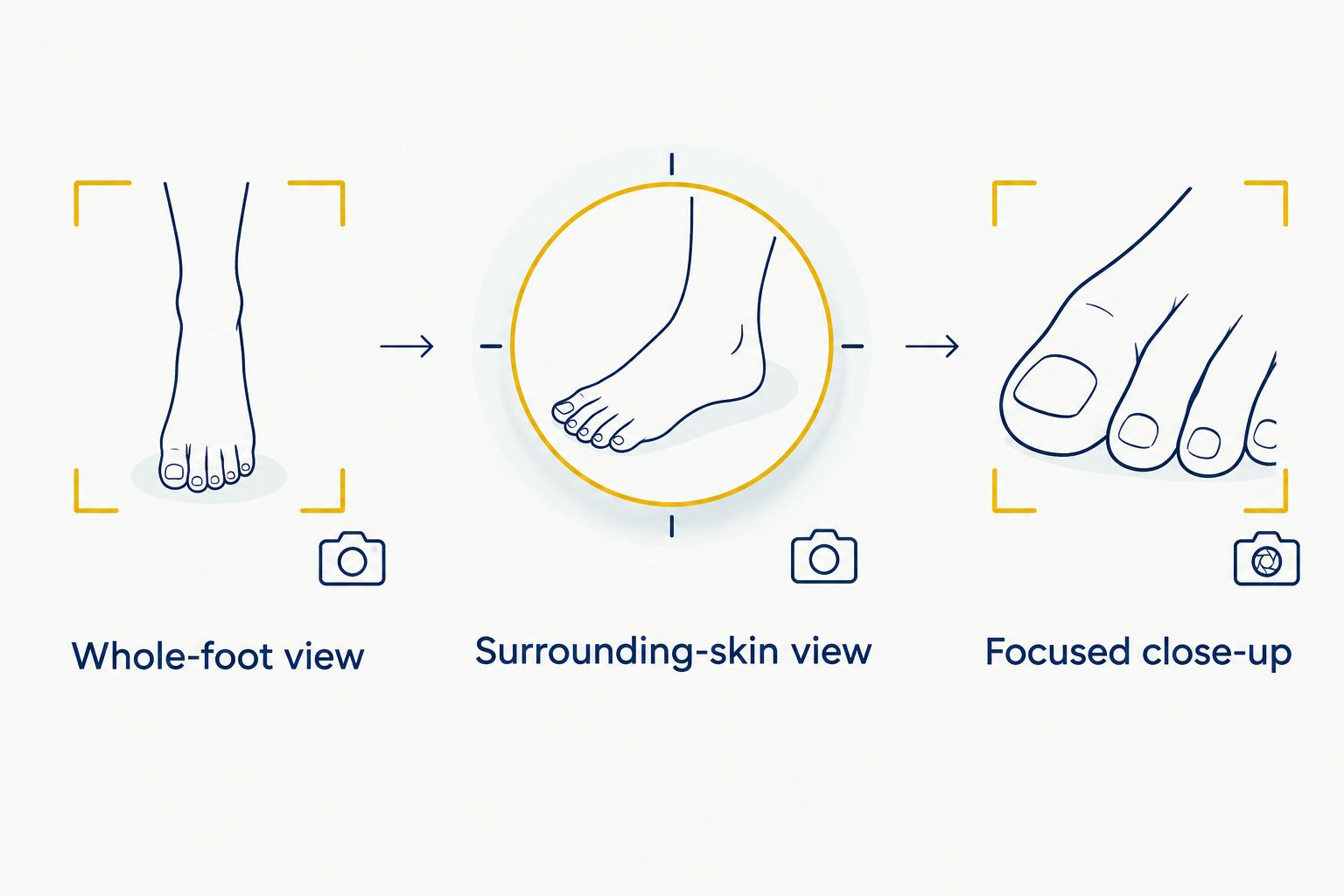
- If consistent with your clinician's instructions, take 3 photos per session: a whole-foot view, a surrounding-skin view, and a focused close-up. This is an organizational suggestion, not a required clinical protocol.
- Keep the camera square to the wound where practical. Use a similar distance across sessions so apparent size changes are not simply changes in framing.
- Review the images before redressing. Retake blurred or overexposed photographs while the wound is already uncovered for its authorized dressing change.
- Record the actual capture date and time, the foot, and the wound location. Do not rely only on the upload date, especially when sending an older image.
Expected result: The reviewer can identify the wound and compare its appearance with earlier images. The photo set still does not establish depth or confirm healing.
Secure submission and clinician review
Send images with symptom context
- Open the communication channel your treating team approved. Check 2 identifiers requested by that service, such as your name and date of birth, before submitting health information.
- Select the correctly dated images and identify the wound location in the accompanying message. Keep separate wounds clearly distinguished.
- Describe changes since the previous review: drainage, odor, redness, swelling, pain, fever, dressing problems, and difficulty using your prescribed pressure-relief device. Report new numbness or discoloration rather than leaving the clinician to infer symptoms from a photo.
- Include requested glucose information with the date, time, and units displayed on your meter. Send only the readings your care team asks for; do not change diabetes medicines based on wound appearance.
- Check whether the submission appears in the intended conversation or shows the confirmation described by the service. Use the agreed backup route if delivery is uncertain.
Expected result: The clinician receives an identifiable, dated wound update with relevant symptoms. A successful upload is not permission to wait through deterioration.
For a 2026 care record, retain the original capture date when resending an image. Clearly label an older photo as older; otherwise, it can be mistaken for today's wound appearance.
Close the loop after review
- During the appointment, explain what has changed and show the dressing or pressure-relief device if requested. Keep a caregiver present with your permission when you need help handling the camera or remembering instructions.
- Ask whether you need an in-person examination, wound cleaning or debridement, circulation assessment, imaging, or another service that remote review cannot provide.
- Repeat the instructions back in plain language. Confirm dressing care, permitted activity, pressure relief, and the next appointment.
- Record the clinician's response alongside the image date. If an instruction is unclear or conflicts with an earlier plan, contact the team before improvising.
Expected result: Every reviewed update ends with a documented next action. Continue the existing prescribed plan unless your clinician changes it or emergency instructions take priority.
Photo messages, video visits, and in-person care
These formats serve different purposes. Choose the format your clinician recommends, not the one that produces the clearest picture.
| Review format | Best for | Main benefit | Main limitation |
|---|---|---|---|
| Secure photo message | Clinician-approved updates on an established wound | Provides dated images for comparison | Is not necessarily reviewed immediately and lacks a hands-on examination |
| Video follow-up | Scheduled discussion of symptoms and the care plan | Allows questions and guided camera positioning | Cannot provide debridement, reliable depth assessment, or circulation testing |
| In-person assessment | New ulcers, deterioration, or examination and treatment needs | Allows direct examination and procedures when indicated | Requires travel and practical arrangements for safe mobility |
Naples Podiatrist provides diabetic wound care; do not assume that every ulcer or appointment qualifies for remote management. Read the guide to telehealth podiatry visits and what can be treated remotely, then confirm the appropriate format with the office.
Variant: updates between scheduled appointments
A second workflow fits patients whose clinician requests interim photographs. It supplements scheduled care rather than creating an on-demand emergency service.
- Use the same approved channel and image views for each requested update.
- Put the capture date and wound location at the start of the message.
- State what changed since the last reviewed update, including problems following the treatment plan.
- Follow the agreed review window and call if that window passes without instructions.
- Switch to urgent assessment when warning signs appear; do not keep adding photographs to an unanswered thread.
For caregivers helping in 2026, confirm permission and any account-access requirements before sending images on someone else's behalf. Avoid shared account credentials when the service provides an authorized caregiver-access process.
Best for: Patients already assessed by a clinician who have a defined interim monitoring plan. The benefit is a clearer record between visits; the limitation is delayed review and the absence of physical examination.
Troubleshooting
The wound looks smaller in today's photograph
Check the camera angle, distance, and lighting before interpreting the change. Send comparable images and let the clinician assess progress; a smaller-looking surface does not establish what is happening underneath.
The upload fails or the attachment is missing
Follow the service's actual attachment instructions and check that the intended files are included. Call the office if you cannot confirm delivery; do not move sensitive images to a personal email address or social-media message without the team's direction.
You cannot photograph the sole safely
Ask an authorized caregiver for help while you remain seated with the foot supported. If a safe view is still impossible, tell the team and arrange an appropriate assessment instead of standing barefoot or walking on the ulcer.
No one has replied
Use the response window agreed with your treating team, then call the designated contact. Worsening symptoms override that window: seek urgent assessment rather than waiting for a portal notification.
The photograph looks reassuring but symptoms worsen
Report the symptoms directly. A photograph cannot show every infection, circulation problem, or deeper wound complication, and reduced sensation makes pain an unreliable safety check.
Customize your workflow
Keep the record simple enough to maintain. Store each dated photo set with its symptom note, clinician response, and next action in the approved system rather than spreading updates across several conversations.
Ask about practical barriers early: poor vision, hand stiffness, hearing difficulty, limited internet access, or trouble using a pressure-relief device. In 2026, a useful digital workflow still depends on whether you can follow the physical treatment plan safely.
Tell your clinician if your goal is returning to pickleball, golf, running, or walking with family. A better-looking photo is not clearance to resume weight-bearing activity. Request specific activity instructions while the ulcer remains under treatment.
FAQ
Can diabetic foot ulcer telehealth follow-up replace office visits?
No. Diabetic foot ulcer telehealth follow-up can supplement clinician-directed care, but it cannot replace examinations or procedures your wound requires. Your treating clinician determines the appropriate visit format.
Can a doctor tell whether my diabetic foot ulcer is infected from a photo?
A photo alone cannot reliably rule out infection. Report redness, warmth, swelling, drainage, odor, fever, and other changes directly, and seek urgent assessment when warning signs appear.
How often should I send wound photographs?
Send wound photographs on the schedule your treating clinician sets. Do not remove a dressing or cast outside your instructions just to create an update.
What should I include with a foot-ulcer photo?
Include the capture date, wound location, and changes in symptoms or drainage. Add the treatment difficulties and glucose information your clinician requests so the image has useful context.
Should I wait for a telehealth appointment if my foot turns black?
No. A newly black, blue, pale, or cold foot needs emergency evaluation, especially when the change is sudden. Do not delay care to upload photographs.
Can my caregiver take and send my wound photos?
A caregiver can help with your permission and through the access process your treating service approves. Confirm account authorization and keep photography consistent with your prescribed dressing-change plan.
Does Naples Podiatrist offer remote follow-up for every diabetic ulcer?
Do not assume every diabetic ulcer is suitable for remote follow-up. Contact Naples Podiatrist to confirm whether remote review is offered and appropriate for your condition; a new or worsening wound needs direct clinical guidance.
One last thing
No pain does not mean no danger. Diabetic nerve damage can hide the discomfort that would otherwise draw attention to a worsening wound.
Make the final check about the whole situation: symptoms, surrounding skin, drainage, pressure relief, and the clinician's next instruction. The strongest photo record is the one that leads to timely care, not simply a larger collection of images.
Related guides
- How to check your feet daily with diabetes
- How to tell if a diabetic foot wound is infected
- Advanced wound care for non-healing foot wounds